


Graph databases offer several significant advantages over relational databases, particularly in terms of data modeling and query performance: Flexible Data Modeling: Graph databases excel at representing complex relationships and hierarchies. They use nodes, edges, and properties to directly model eRead more
Mains Answer Writing Latest Questions
What are the most significant advantages of using a graph database over a relational database in terms of data modeling and query performance?

-
Process States Explanation: In operating systems, a process is a program in execution. As a process runs, it goes through different states. These states represent the current condition of the process in the system. Let's break down the main process states: 1. New: The process is being created. 2. ReRead more
Process States Explanation:
In operating systems, a process is a program in execution. As a process runs, it goes through different states. These states represent the current condition of the process in the system. Let’s break down the main process states:
1. New: The process is being created.
2. Ready: The process is waiting to be assigned to a processor.
3. Running: The process is currently executing on the processor.
4. Waiting (or Blocked): The process is waiting for some event to occur (like I/O completion).
5. Terminated: The process has finished execution.Examples:
1. New: When you double-click on an application icon, the operating system creates a new process.
2. Ready: Multiple programs open on your computer, waiting for their turn to use the CPU.
3. Running: The video game you’re currently playing.
4. Waiting: When you click “Save” in a document and wait for it to complete.
5. Terminated: When you close an application, and it finishes its execution.Now, let’s visualize these states with a diagram:
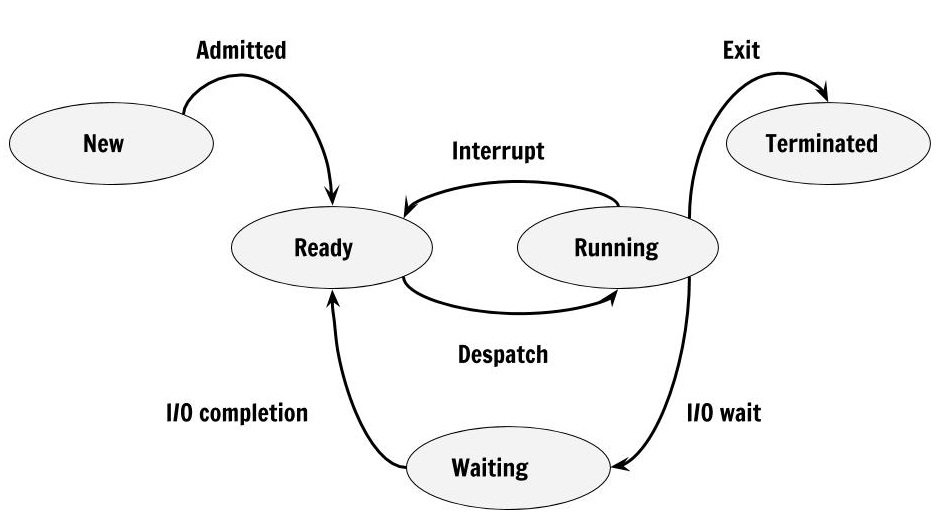
Explanation of the diagram:
1. A new process starts in the “New” state.
2. It then moves to the “Ready” state, waiting for the CPU.
3. When the scheduler selects it, it goes to the “Running” state.
4. From “Running,” it can:
a) Go back to “Ready” if its time slice expires.
b) Move to “Waiting” if it needs to wait for a resource or event.
c) Proceed to “Terminated” if it completes execution.
5. From “Waiting,” it returns to “Ready” when the waited-for event occurs.This cycle continues until the process terminates.
See less

-
Process States Explanation: In operating systems, a process is a program in execution. As a process runs, it goes through different states. These states represent the current condition of the process in the system. Let's break down the main process states: 1. New: The process is being created. 2. ReRead more
Process States Explanation:
In operating systems, a process is a program in execution. As a process runs, it goes through different states. These states represent the current condition of the process in the system. Let’s break down the main process states:
1. New: The process is being created.
2. Ready: The process is waiting to be assigned to a processor.
3. Running: The process is currently executing on the processor.
4. Waiting (or Blocked): The process is waiting for some event to occur (like I/O completion).
5. Terminated: The process has finished execution.Examples:
1. New: When you double-click on an application icon, the operating system creates a new process.
2. Ready: Multiple programs open on your computer, waiting for their turn to use the CPU.
3. Running: The video game you’re currently playing.
4. Waiting: When you click “Save” in a document and wait for it to complete.
5. Terminated: When you close an application, and it finishes its execution.Now, let’s visualize these states with a diagram:
Explanation of the diagram:
1. A new process starts in the “New” state.
2. It then moves to the “Ready” state, waiting for the CPU.
3. When the scheduler selects it, it goes to the “Running” state.
4. From “Running,” it can:
a) Go back to “Ready” if its time slice expires.
b) Move to “Waiting” if it needs to wait for a resource or event.
c) Proceed to “Terminated” if it completes execution.
5. From “Waiting,” it returns to “Ready” when the waited-for event occurs.This cycle continues until the process terminates.
See less
-
New: Description: The process is being created. In this state, the operating system is setting up the process control block (PCB), memory allocation, and other necessary resources. Example: When you start a new application, it begins in the new state while the OS sets up its environment. ReadRead more
- New:
- Description: The process is being created. In this state, the operating system is setting up the process control block (PCB), memory allocation, and other necessary resources.
- Example: When you start a new application, it begins in the new state while the OS sets up its environment.
- Ready:
- Description: The process is prepared to run but is waiting for CPU allocation. It has all the resources it needs except the CPU.
- Example: Multiple processes might be in the ready state, waiting their turn to be executed by the CPU.
- Running:
- Description: The process is currently being executed by the CPU. At this moment, the CPU is actively working on the instructions of this process.
- Example: When the CPU starts executing the instructions of a text editor, the text editor process is in the running state.
- Waiting (or Blocked):
- Description: The process cannot continue executing until some external event occurs (such as an I/O operation completion). It is not ready to use the CPU until this event is resolved.
- Example: If a process needs to read data from a disk, it will move to the waiting state until the disk I/O operation is completed.
- Terminated (or Exit):
- Description: The process has finished its execution. This state means that the process has completed its task and is being removed from the process table.
- Example:When you close an application, the process goes into the terminated state after finishing its execution and cleanup activitie
- New:

-
This answer was edited.
A process is like a task that a computer is executing. It may be in different states depending on what it is doing. The following are the main process states: New :Process has just been created. Ready: Process is ready to run but waiting for CPU to get free. Running: Process is being executed by CPURead more
A process is like a task that a computer is executing. It may be in different states depending on what it is doing. The following are the main process states:
New :Process has just been created.
Ready: Process is ready to run but waiting for CPU to get free.Running: Process is being executed by CPU now.
Waiting: Process waits for some event (for example, waiting for user input or for a file to be read).
Terminated: This means that the process has completed execution and has died.From New to Ready: Here, we have set our process up and it’s ready to execute.
From Ready to Running: While running, the CPU chooses this process of all other processes that are available at that time
From Running to Waiting: In order for the processor or any of its resources not to go idle when running the program, it should pause until an event occurs such as an input clause
From Waiting to Ready: The state which follows after waiting can only happen if some events occur otherwise it will remain constant.
From Running to Terminated: The task has been accomplished by this process
See less

-
In a multi-process operating system, the resource allocation algorithm is known as the Banker's Algorithm. It is utilized to manage resource allocation. It's used to make sure that a group of programs on a single computer can share the resources they have (like CPU time, memory, I/O devices, etc.).Read more
In a multi-process operating system, the resource allocation algorithm is known as the Banker’s Algorithm. It is utilized to manage resource allocation. It’s used to make sure that a group of programs on a single computer can share the resources they have (like CPU time, memory, I/O devices, etc.). fairly and effectively.
The Investor’s Calculation works by reproducing a ledger for each interaction, where the assets distributed to the cycle are treated as stores into the record. The process’s “funds,” or resources, are checked by the algorithm to see if they are sufficient to allocate the requested resources. In the event that it does, the allocation is carried out, and the process’s account is updated in line with this. The allocation is stopped until sufficient resources are available.
The algorithm ensures that no process can acquire more resources than it has been allocated and that no process can exceed its resources. This ensures that processes can run safely and effectively while also preventing deadlocks.
See less


Do you think artificial intelligence can ever replace human intelligence?
-
Artificial intelligence (AI) can perform specific tasks with remarkable efficiency and accuracy, often surpassing human capabilities in areas like data processing, pattern recognition, and complex calculations. However, human intelligence encompasses creativity, emotional understanding, moral reasonRead more
Artificial intelligence (AI) can perform specific tasks with remarkable efficiency and accuracy, often surpassing human capabilities in areas like data processing, pattern recognition, and complex calculations. However, human intelligence encompasses creativity, emotional understanding, moral reasoning, and intuition—qualities that are currently beyond the reach of AI.
While AI continues to advance, it remains a tool designed and controlled by humans. The prospect of AI replacing human intelligence entirely is improbable because human cognition is deeply intertwined with consciousness, ethical judgment, and complex social interactions—areas where AI struggles. Instead of replacing humans, AI is more likely to augment human capabilities, automating routine tasks and providing insights that enhance decision-making across various domains. Therefore, while AI can simulate certain aspects of human intelligence, the comprehensive range of human abilities and the essence of consciousness remain uniquely human traits unlikely to be fully replicated by machines.
See less

Do you think artificial intelligence can ever replace human intelligence?
-

Artificial intelligence (AI) has made impressive progress, transforming many industries with its capabilities. However, the idea that AI can completely replace human intelligence is debatable. AI is excellent at processing large amounts of data, performing repetitive tasks, and recognizing patterns.Read more
Artificial intelligence (AI) has made impressive progress, transforming many industries with its capabilities. However, the idea that AI can completely replace human intelligence is debatable. AI is excellent at processing large amounts of data, performing repetitive tasks, and recognizing patterns. It can surpass humans in specific areas, like playing chess or diagnosing some medical conditions.
Despite this, human intelligence includes a wider range of abilities such as emotional understanding, creativity, ethical judgment, and abstract thinking. These qualities are difficult for AI to replicate.
For example, while AI can create art or music, it lacks the emotional depth and originality that human artists have. Ethical decisions require an understanding of human values and experiences, which AI, based on algorithms, cannot fully comprehend.
Furthermore, human intelligence is adaptable and learns from diverse experiences, whereas AI is confined to the data it is trained on. A partnership between AI and human intelligence can lead to great advancements by combining their strengths. AI can enhance human capabilities, but it cannot replace the complex and multifaceted nature of human intelligence. In conclusion, while AI will continue to advance and play a significant role in our lives, it is unlikely to completely replace human intelligence.
See less

In an era of pervasive data collection and surveillance, how can we balance the benefits of data-driven insights with the protection of individual privacy rights? What ethical frameworks should guide the collection, storage, and use of personal data by corporations ...
-
Balancing Data-Driven Insights with Privacy Protection In an era of extensive data collection and surveillance, balancing the benefits of data-driven insights with privacy protection is crucial. Effective ethical frameworks are needed to guide data practices by corporations and governments. EthicalRead more
Balancing Data-Driven Insights with Privacy Protection
In an era of extensive data collection and surveillance, balancing the benefits of data-driven insights with privacy protection is crucial. Effective ethical frameworks are needed to guide data practices by corporations and governments.
Ethical Frameworks for Data Collection and Use:
- Transparency and Consent: Clearly communicate data usage policies and obtain informed consent. For instance, tech companies should transparently explain how user data is collected and used, securing explicit consent before processing.
- Data Minimization: Collect only necessary data to fulfill specific purposes. Cloud providers should limit data collection to what is required for service functionality, reducing privacy risks.
- Purpose Limitation: Use data strictly for the purposes for which it was collected. For example, a health app should use personal health data only for health tracking and not for unrelated marketing.
- Security Measures: Employ robust security measures such as encryption and regular audits to safeguard data. IT systems must be fortified to prevent unauthorized access.
- Accountability and Enforcement: Implement regulatory oversight and independent audits to ensure compliance. Establishing clear reporting channels for misuse and promoting transparency are essential for enforcement.
- Respect for User Rights: Ensure users can access, correct, and delete their data, empowering them to control their information.
These frameworks help balance data utilization with privacy protection, fostering trust and ensuring ethical data practices.
See less

The core functions of an OS include, Process Management-Keeping track of how and when processes are created, scheduled to run on the processor (CPU), stopped from running, etc. It makes certain that the procedures are performed at a correct rate and it assigns CPU time among all of these processes aRead more
The core functions of an OS include,
Process Management-Keeping track of how and when processes are created, scheduled to run on the processor (CPU), stopped from running, etc. It makes certain that the procedures are performed at a correct rate and it assigns CPU time among all of these processes as well for performing multitasking(tasks).
The OS Manages The Memory Of The Computer (RAM + Cache) In short, it is responsible for managing memory allocation to processes ( mapping ), providing protection between separated regions of the program from accessing not owned data and taking care of swapping pages into disk when RAM run out.
File System Management – OS is responsible for managing files on the computer, such as file types (like image, text), creating new files at particular location in drive or deleting existing ones and granting permissions to add data. It arranges files into directories, and it provides a way by which applications can access and manipulate these files.
See less